A shortcut editing keyboard can make a noticeable difference to the time you spend editing video, producing music or working in creative software. By placing frequently used commands directly on the keys, it helps you find the functions you need without constantly searching through menus, opening help pages or trying to remember obscure keyboard combinations.
For someone who edits for several hours a day, these small improvements can add up. A few seconds saved on a frequently repeated action, multiplied across hundreds of edits or musical adjustments, can make a meaningful difference to the amount of work completed in a day. This guide explores how shortcut editing keyboards work, where they are most useful and how to decide whether one could be a worthwhile investment for your editing setup.

What is a shortcut editing keyboard?
A shortcut editing keyboard is a computer keyboard designed around the software you use. Alongside the usual letters, numbers and symbols, it displays the keyboard shortcuts for common editing and production commands directly on the keys.
A standard keyboard might have a key marked with the letter V. On a dedicated Premiere Pro keyboard, that key can also display the function assigned to it within the application. Other keys show commands for cutting clips, selecting tools, navigating the timeline or working with audio.
Editors Keys produces software-specific shortcut keyboards for applications such as Adobe Premiere Pro, Final Cut Pro, DaVinci Resolve, Avid Media Composer, Pro Tools, Logic Pro, Ableton Live and Cubase. The layouts are designed to make the most useful commands easier to identify and learn.

How do shortcut keyboards work?
A shortcut editing keyboard connects to your Mac or PC in the same way as a standard keyboard. When you press a key, it sends the corresponding keyboard input to the computer, and the editing software interprets that input according to its shortcut settings.
For example, Premiere Pro includes commands for selecting tools, cutting clips, moving through the timeline and adjusting the edit. Its Keyboard Shortcuts panel allows you to search for commands, view assigned keys and customise your shortcuts. Editors Keys keyboards make these commands easier to identify by printing the relevant shortcuts directly on the physical keys.
The keyboard does not replace the editing software or perform the actual edit itself. It provides a visual reference for the commands you use, helping you find the correct key and develop a more efficient workflow.
How much time can an editing keyboard save?
There is no universal number of minutes that every editor will save by switching to a dedicated shortcut keyboard. The result depends on the software you use, how familiar you are with its shortcuts, the type of work you do and how often you repeat the same actions.
Consider a video editor who performs 300 shortcut-based operations during a typical working day. If using a dedicated keyboard saves an average of two seconds on each operation, that amounts to 10 minutes per day. Across 220 working days, the total would be approximately 36 hours and 40 minutes.
This is an illustrative calculation, rather than a measured industry average. Some commands will be faster to perform using a keyboard, while others may take the same amount of time or require a mouse. The point is that small improvements can accumulate when you perform the same actions hundreds of times.
The potential time saving is particularly relevant for professional editors, freelancers and music producers who spend several hours a day working in creative software. Even a modest reduction in repetitive tasks can make a difference to how much work you complete and how much time you have available for other projects.

Where the time savings come from
The biggest improvements usually come from a combination of faster access to familiar commands and fewer interruptions. An editor who already knows the shortcuts for cutting clips, moving through the timeline and switching tools may find that the printed layout makes those commands easier to reach consistently.
Someone who is still learning the software may initially spend more time checking the keys. However, the keyboard can become a useful reference as they develop their knowledge, reducing the need to search for the same commands repeatedly.
A dedicated shortcut keyboard can also help you discover functions you might otherwise overlook. When useful commands are visible on the keys, you are more likely to learn them and incorporate them into your workflow.

Why do keyboard shortcuts save time?
Less time searching through menus
The most obvious advantage is the time saved when you need a particular function but cannot immediately remember its shortcut. Opening a menu, locating the correct category and selecting the command can interrupt your work, especially when you are editing a large project.
Premiere Pro includes a Keyboard Shortcuts panel with a search function, and its menus display shortcuts where they are available. These features are useful for learning and customising your workflow, but a dedicated keyboard gives you a physical reference on your desk. You can look down, find the command and return to your work without opening another window.
Fewer interruptions to your creative flow
Editing involves making many small decisions. You might be listening to dialogue, adjusting a cut to the rhythm of music or deciding whether a shot should remain in the sequence. Stopping to remember a command can break that process.
A shortcut keyboard keeps frequently used commands within easy reach. Once you become familiar with the layout, your hands can stay on the keyboard while you work, reducing the need to move between the keyboard, mouse and software menus.
Easier shortcut memorisation
Learning a long list of keyboard shortcuts can be difficult when you are working with a normal keyboard and have no visual reference. A dedicated keyboard makes the process easier because the functions are printed directly on the keys.
For example, if you are learning the Blade tool in Premiere Pro, you can look at the relevant key on the keyboard rather than repeatedly opening the shortcut settings. Over time, you begin to associate the physical position of the key with the command, and you may find that you no longer need to look it up.
This is particularly useful when you are learning a new application, moving from one editing software to another or trying to become more efficient with a programme you already know.

How much time can video editors save with a shortcut keyboard?
Video editing is one of the clearest examples of where a dedicated shortcut keyboard can be useful. Editors frequently repeat the same actions throughout a project, from selecting clips and moving through the timeline to trimming, cutting, adding transitions and adjusting audio.
Cutting and trimming footage
When assembling a sequence, you may need to cut a clip at a precise point, remove unwanted footage, ripple-edit a gap or adjust the length of a shot. These operations can be repeated hundreds of times in a single project.
A shortcut keyboard makes it easier to locate the relevant commands and develop the habit of using them. Instead of moving between the timeline and menus, you can keep your hands near the keys and work through the sequence more efficiently.
Navigating the timeline
Timeline navigation is another area where small time savings can accumulate. Moving to the next edit, jumping to a marker, zooming in to a specific section or moving between clips are all actions that can be performed repeatedly during an editing session.
A keyboard with the relevant shortcuts printed on the keys can help you learn these commands and use them more naturally. This is particularly useful for editors who work with long timelines, large amounts of footage or fast-paced content.
Effects, transitions and audio
Shortcut editing keyboards can also help with common effects and audio functions. Depending on the software and the shortcuts assigned to it, you may use commands to add transitions, open effect controls, adjust clip gain, enable or disable tracks, or move between different editing panels.
These functions can take time to locate when you are unfamiliar with the application. Having them mapped out on the keyboard can make the workflow more consistent and help you become more confident with the software.
Adobe Premiere Pro
Adobe Premiere Pro is a popular choice for professional and freelance video editors. Adobe provides a Keyboard Shortcuts panel where users can search for commands, assign keys and save customised shortcut sets.
The Editors Keys Adobe Premiere Pro keyboard includes over 100 Premiere Pro shortcuts printed directly on the keys. It is available as the AB10 Air wireless keyboard or the AB10 Core wired keyboard, with colour-coded functions to help you find commands quickly.
Shortcut keyboards for music production
Music producers use many of the same types of commands as video editors. Recording, stopping playback, moving through a project, editing clips, changing tools and managing tracks can all be repeated many times during a session.
The difference is that music production often involves a combination of creative decisions and technical adjustments. A producer may be recording guitar, editing a vocal take, arranging a drum pattern, automating a synthesiser or mixing a song. A shortcut keyboard can help reduce the time spent searching for the relevant function and make the workflow more consistent.
Ableton Live
Ableton Live is designed around clips, scenes, tracks and a range of creative production tools. A dedicated keyboard can help producers learn the shortcuts used to navigate sessions, manage clips, work with tracks and control common editing functions.
Editors Keys offers an Ableton Live shortcut keyboard with the relevant commands printed on the keys, allowing producers to find the functions they use most often while working on music.
Pro Tools
Pro Tools is widely used for recording, editing and mixing audio. A shortcut keyboard can be useful when working with large sessions, where you may need to move between tracks, edit clips, adjust fades, change tools and manage playback frequently.
The Editors Keys Pro Tools keyboard includes over 100 shortcuts, with colour-coded functions printed on the keys. It is available in both AB10 Air wireless and AB10 Core wired versions.
Logic Pro and Cubase
Logic Pro and Cubase users can also benefit from dedicated shortcut keyboards. Both applications contain a wide range of editing and production commands, and learning the shortcuts for common operations can help you work more efficiently.
Editors Keys offers a dedicated Logic Pro keyboard for Mac users, along with a Cubase keyboard that includes over 150 commands organised by function. These models are designed to make frequently used shortcuts easier to locate and remember.
Other programs
Microsoft Flight Simulator
Microsoft Flight Simulator users can also benefit from a shortcut keyboard, particularly when learning cockpit controls and managing a large number of aircraft functions. A dedicated keyboard can make frequently used commands easier to find, from adjusting flaps and landing gear to controlling the autopilot, switching views and navigating the simulator. Having the shortcuts printed on the keys helps players learn the controls more easily and spend less time searching through the settings menu, allowing them to concentrate on flying.

How Editors Keys keyboards can improve your workflow
The Editors Keys shortcut keyboard range is designed for people who want to spend less time searching for commands and more time working on their projects. The keys display the shortcuts for your chosen software, making it easier to find the function you need and learn the commands through repeated use.
The AB10 Air and AB10 Core are the main wireless and wired backlit keyboard options in the range. Both are designed for editing and music production, with software-specific shortcut layouts and adjustable backlighting.

AB10 Air wireless backlit shortcut keyboard
The AB10 Air is a wireless shortcut editing keyboard designed for Mac and PC users who want a cleaner, cable-free workspace. It features Bluetooth connectivity, allowing you to pair it with up to three devices, and adjustable backlighting for working in darker environments.
The AB10 Air is particularly useful if you regularly switch between a desktop computer, laptop or tablet. Its wireless design means you can keep your workspace flexible while still having the shortcuts for your editing software directly on the keys.
AB10 Core wired USB-C backlit shortcut keyboard
The AB10 Core is the wired alternative for editors who prefer a direct USB-C connection. It is suitable for a permanent editing setup where you want a dedicated keyboard without needing to charge a battery.
The AB10 Core provides the same software-specific shortcut layout as the corresponding wireless model, making it a practical option for video editors and music producers who want the convenience of printed shortcuts with a reliable wired connection.

Colour-coded shortcut keys
Editors Keys keyboards use colour-coded functions to make it easier to recognise different types of commands. The red bar represents Command, the blue bar represents Shift and the green bar represents Option.
These colour groups help you identify modifier keys and their associated shortcuts more quickly. This can be useful when learning software-specific commands or when you need to locate a function without opening the software's help menu.
Silicone keyboard covers for video editing and music production
A silicone shortcut keyboard cover is another option for editors who want the benefits of a dedicated layout without replacing their existing keyboard. These covers fit over compatible keyboards and display the relevant shortcuts for your chosen editing software.
The main advantage is that you can continue using the keyboard you already own while gaining a visual reference for the commands you need. This can be particularly useful if you are learning a new application, working between different computers or want to try a shortcut-focused workflow before investing in a new keyboard.
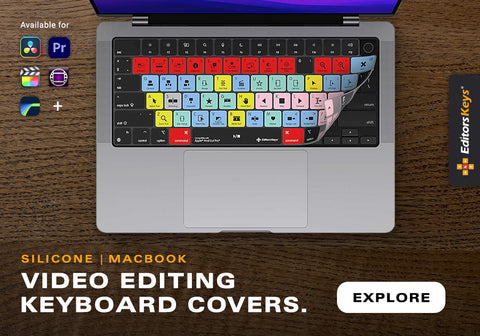
Editors Keys silicone keyboard covers are available for a range of video editing and music production applications. They feature shortcuts printed directly onto the cover, helping you find commonly used commands and memorise them through repeated use.
Silicone covers also provide a layer of protection against dust and light spills. They can be removed for cleaning, making them a practical option for busy editing desks and home studios.
Is an editing keyboard worth the investment?
The value of a shortcut editing keyboard depends on how much you use your editing software and how often you repeat the same commands. If you only edit occasionally, a standard keyboard and the built-in shortcut reference may be enough. If you spend several hours a day editing, producing music or working on large projects, a dedicated keyboard is more likely to make a noticeable difference.
A useful way to decide is to consider how often you currently stop to search for a shortcut. If you regularly open menus, look through help pages or pause to remember the correct key combination, a keyboard with the commands printed on the keys could help reduce those interruptions.
It is also worth considering the learning curve. A dedicated keyboard is not a replacement for learning the shortcuts, and you may not save much time during the first few sessions. The benefits become more apparent as you become familiar with the layout and begin to use the commands without thinking about them.
What if I only use a few shortcuts?
You do not need to use every shortcut on the keyboard to benefit from it. Many editors have a small group of commands that they use repeatedly throughout the day, such as cutting clips, moving through the timeline, switching tools or starting and stopping playback.
If you can identify the shortcuts that take up most of your time, a dedicated keyboard may be useful even if you do not learn the entire layout. The printed commands can act as a reference for the functions you use most often, and you can gradually learn more as your workflow develops.
Frequently asked questions
How much faster is a shortcut keyboard than a normal keyboard?
There is no reliable universal percentage that applies to every editor. A shortcut keyboard can reduce the time spent looking for commands and make repeated operations easier to perform, but the actual improvement depends on the software, your familiarity with shortcuts and how often you use them.
Do I need to memorise every shortcut?
No. You can use the printed commands as a reference while you learn the shortcuts that matter most to your workflow. Over time, the keyboard can help you memorise frequently used commands without needing to learn every function in the software.
Will a shortcut keyboard work with my existing editing software?
Editors Keys produces keyboards for specific applications, including Premiere Pro, Final Cut Pro, DaVinci Resolve, Media Composer, Pro Tools, Logic Pro, Ableton Live and Cubase. Choose the model that matches your software and operating system.
Is the AB10 Air or AB10 Core better?
The AB10 Air is the wireless option, while the AB10 Core is the wired USB-C version. Both provide the same dedicated shortcut layout for the corresponding software. The choice mainly comes down to whether you prefer wireless flexibility or a direct wired connection.
Start editing more efficiently with Editors Keys
A shortcut editing keyboard is a practical way to improve your workflow if you spend a lot of time in video editing or music production software. Having the commands printed on the keys makes it easier to find the functions you use most often, while repeated use helps you memorise shortcuts and develop a more efficient editing routine.
The time savings may be small on individual actions, but they can add up across a working day, week or year. If you regularly pause to search for shortcuts or navigate through menus, a dedicated keyboard could be a worthwhile addition to your editing setup.
Explore the Editors Keys AB10 shortcut keyboard range to find a dedicated keyboard for your software, or browse the Editors Keys silicone shortcut keyboard covers if you want to upgrade your existing keyboard with a software-specific shortcut layout.