If you're editing in Adobe Premiere Pro 26.3, you've already got one of the most powerful video editing applications available. Adobe continues to improve Premiere Pro every year with AI-powered tools, better colour management, faster rendering and more intuitive editing features. However, even with all of these improvements, third-party plugins remain one of the easiest ways to speed up your workflow, achieve professional-looking results and unlock creative effects that simply aren't available out of the box.
Whether you're a YouTuber, filmmaker, wedding videographer, content creator or commercial editor, the right plugin can save hours of editing while dramatically improving the quality of your finished videos.
In this guide we'll look at the 10 best Premiere Pro plugins in 2026, explaining what each one does, who it's best suited for, typical pricing and where you can download it.

Why Use Plugins in Premiere Pro?
The latest version of Premiere Pro already includes impressive AI tools including automatic captioning, generative extend, scene edit detection and improved colour workflows.
Plugins take things even further by helping you:
-
Create cinematic colour grades
-
Remove unwanted noise and grain
-
Stabilise difficult handheld footage
-
Speed up repetitive editing tasks
-
Produce cleaner transitions
-
Create Hollywood-quality visual effects
-
Improve audio quality
-
Save hours during post-production
Many professional production companies rely on plugins every day because they allow editors to produce better work in less time.
1. Boris FX Continuum
Best for Professional Visual Effects and Transitions
One of the most respected plugin collections available, Boris FX Continuum contains hundreds of effects used throughout television, advertising and film production.
It includes:
-
Cinematic transitions
-
Lens flares
-
Film damage effects
-
Beauty retouching
-
Motion graphics
-
Glow effects
-
Particle generators
-
Image restoration
-
Title effects
The plugin collection integrates directly inside Premiere Pro 26.3 and benefits from GPU acceleration for smooth playback.

Typical Price
Approximately £250–£700, depending on licence type.
Best For
-
Professional editors
-
Production companies
-
Commercial video work
-
Corporate filmmaking
Where to get it:
Download directly from the Boris FX website.
2. Red Giant Magic Bullet Suite (Maxon)
Best Colour Grading Plugin
If colour grading is an important part of your workflow, Magic Bullet Suite remains one of the industry's favourites.
It provides:
-
Professional colour correction
-
Film stock emulation
-
Skin smoothing
-
Diffusion filters
-
Lens effects
-
Exposure correction
-
Cinematic finishing looks

Rather than spending hours building grades manually, many editors can achieve beautiful results in minutes. Magic Bullet also works seamlessly alongside Premiere Pro's Lumetri Colour tools.
Typical Price
Around £20–£60 per month as part of the Maxon One subscription.
Best For
-
Wedding videographers
-
Filmmakers
-
Commercial work
-
Documentary editing
Available from Maxon's website.
3. Neat Video
Best Noise Reduction Plugin
Low-light footage often introduces digital noise that can make expensive cameras look surprisingly poor.
Neat Video remains the gold standard for removing:
-
Sensor noise
-
Compression artefacts
-
ISO grain
-
Colour speckling
Unlike simple blur filters, Neat Video analyses footage frame by frame while preserving fine detail. It's particularly useful when editing footage captured in dark venues, concerts, events or weddings.

Typical Price
Around £70–£140 depending on edition.
Best For
Anyone shooting in difficult lighting conditions.
Download from the Neat Video website.
4. FilmConvert Nitrate
Best Film Emulation Plugin
FilmConvert has become incredibly popular among filmmakers looking to recreate the appearance of traditional film stocks.
Features include:
-
Kodak emulation
-
Fuji emulation
-
Authentic grain
-
Camera profile matching
-
Film response curves
Rather than simply adding grain, FilmConvert analyses your camera profile and applies realistic film characteristics.

Typical Price
Approximately £120–£180.
Best For
-
Short films
-
Music videos
-
Commercial production
-
Documentary filmmakers
5. ReelSmart Motion Blur (RSMB)
Best Motion Blur Plugin
High frame rate footage often looks overly sharp.
ReelSmart Motion Blur intelligently adds natural motion blur back into footage.
This is especially useful for:
-
Drone footage
-
Slow-motion footage
-
CGI
-
Visual effects
-
Motion graphics

The results look far more cinematic than simple directional blur.
Typical Price
Around £90–£160.
Available via ReelSmart Website
6. Universe by Maxon
Best Creative Effects Collection
Universe contains over 90 GPU-accelerated effects.
These include:
-
Retro VHS
-
Film burns
-
Glitches
-
Motion graphics
-
Text animations
-
Background generators
-
Light leaks
-
Stylised transitions
The presets make it easy to create modern YouTube edits, music videos and promotional content.

Typical Price
Included with Maxon One subscription.
Ideal for:
-
Content creators
-
YouTubers
-
Social media editors
-
Motion designers

7. FXFactory
Best Marketplace for Premiere Pro Plugins
FXFactory isn't just one plugin.
It's an entire marketplace containing hundreds of plugins from multiple developers.
You'll find:
-
Animated titles
-
Effects
-
Colour tools
-
Broadcast graphics
-
Utility plugins
-
Transitions
-
Generators
One advantage is that you only purchase the plugins you actually need.

Typical Price
Many plugins are free, while premium plugins range from around £20 to over £200.
8. Motion Bro
Best Free Plugin Collection
If you're looking to improve Premiere Pro without spending a fortune, Motion Bro offers an excellent starting point.
It provides:
-
Drag-and-drop transitions
-
Animated titles
-
Social media templates
-
Lower thirds
-
Callouts
-
Zoom transitions
-
Motion presets
Many features are free, while premium packs expand the available assets.
Typical Price
Free with optional paid expansion packs.
Perfect for YouTubers and content creators.
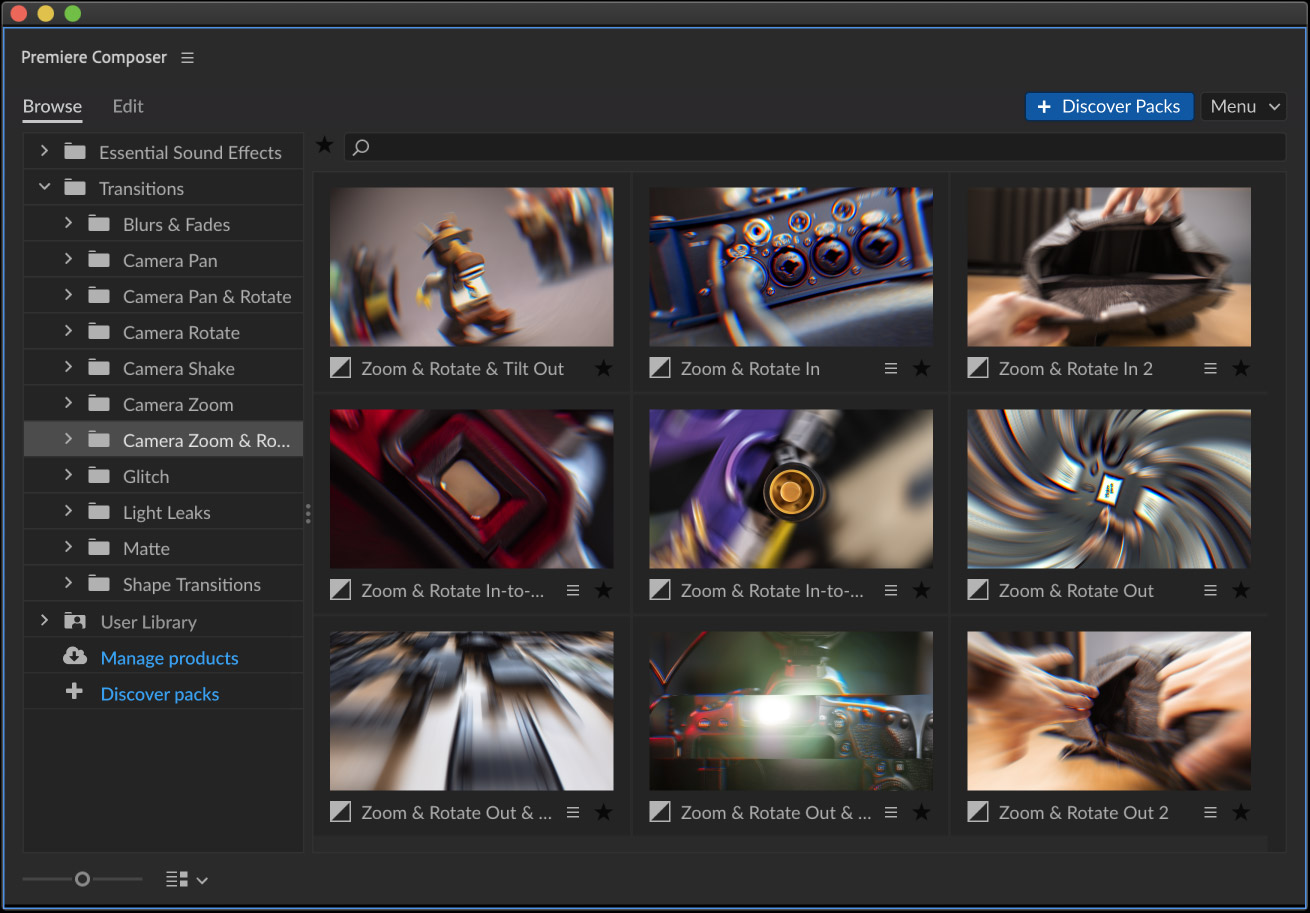
9. Animation Composer by Mister Horse
Best Free Productivity Plugin
Animation Composer has become one of the most widely downloaded Premiere Pro plugins.
It provides:
-
One-click transitions
-
Animated typography
-
Shape animations
-
Motion presets
-
Sound effects
-
Backgrounds
-
Graphics
The free version is incredibly generous, while paid packs add thousands of extra assets.
Typical Price
Free with optional premium packs.
Highly recommended for editors wanting faster results.
10. Excalibur
Best Workflow Plugin
Rather than adding visual effects, Excalibur focuses entirely on speeding up editing.
It allows editors to:
-
Launch commands instantly
-
Create custom shortcuts
-
Automate repetitive tasks
-
Search Premiere functions
-
Build macros
For editors working on large projects every day, this can save countless clicks.

Typical Price
Around £100–£150 from the Knights of the Editing Table Website
Excellent for experienced Premiere Pro editors looking to maximise efficiency.
Which Premiere Pro Plugin Is Best?
The answer depends entirely on your workflow.
| Requirement | Recommended Plugin |
|---|---|
| Colour grading | Magic Bullet Suite |
| Noise reduction | Neat Video |
| Film look | FilmConvert |
| Motion blur | ReelSmart Motion Blur |
| Creative effects | Universe |
| Visual effects | Boris FX Continuum |
| Templates | Premiere Composer |
| Workflow | Excalibur |
| Plugin marketplace | FXFactory |
| Free transitions | Motion Bro |
Many professional editors combine several of these plugins to create a streamlined editing workflow.
Speed Up Premiere Pro Even Further with Editors Keys Shortcut Keyboards
While plugins help improve your footage and unlock powerful new editing tools, there's another upgrade that can dramatically improve your editing speed every single day—your keyboard.
The Editors Keys AB10 Core Wired Backlit Premiere Pro Keyboard and the AB10 Air Wireless Backlit Premiere Pro Keyboard are designed specifically for Adobe Premiere Pro users and feature all of the most commonly used Premiere Pro shortcuts printed directly onto the keys.
Instead of constantly trying to remember keyboard shortcuts or reaching for cheat sheets, every important command is clearly labelled exactly where you need it. Over time, this helps you build muscle memory much faster, making editing feel more natural and efficient.
Editors Keys AB10 Core Wired Keyboard
The AB10 Core is a wired USB-C shortcut keyboard designed for editors who want a reliable, always-connected setup. With adjustable backlighting, it's ideal for editing in darker studios or late into the evening. Because it's wired, there's no need to think about charging batteries or reconnecting Bluetooth devices—simply plug it in and start editing.
It's particularly well suited to professional editors working from a dedicated editing suite where reliability and responsiveness are essential.

Editors Keys AB10 Air Wireless Keyboard
For editors who value flexibility, the AB10 Air offers the same professionally printed Premiere Pro shortcuts in a wireless design. It connects via Bluetooth and supports multiple devices, making it easy to switch between your editing workstation, laptop or tablet with the press of a button.
Its rechargeable battery, slim profile and adjustable backlighting make it an excellent choice for freelancers, hybrid workers and editors who regularly move between locations.
Why a Dedicated Premiere Pro Keyboard Makes Such a Difference
Even experienced Premiere Pro users often rely on only a fraction of the available keyboard shortcuts. By having every major command visible on the keyboard, you'll naturally begin using more shortcuts during everyday editing.
That means less time searching through menus and more time staying focused on the creative side of editing.
Many editors find they can:
-
Trim clips more quickly
-
Navigate timelines faster
-
Edit multicam projects more efficiently
-
Access ripple, roll and slip tools instantly
-
Perform colour grading shortcuts without interrupting their workflow
-
Memorise Premiere Pro shortcuts far more quickly than with a standard keyboard
Combined with the plugins featured above, an Editors Keys shortcut keyboard creates a workflow that's both faster and more enjoyable, helping you spend less time clicking through menus and more time producing great-looking videos.

Final Thoughts
Adobe Premiere Pro 26.3 is already an incredibly capable editing platform, but the right plugins can elevate your projects to another level. Whether you're aiming for cleaner footage with Neat Video, cinematic colour with Magic Bullet, authentic film emulation using FilmConvert or advanced visual effects from Boris FX, there's a plugin to suit almost every style of editing.
Equally important is the speed at which you edit. Pairing these plugins with an Editors Keys AB10 Core Wired or AB10 Air Wireless Premiere Pro shortcut keyboard can help streamline your workflow by putting the software's most important shortcuts right at your fingertips. Together, they create an editing setup that's faster, more intuitive and better suited to the demands of professional video production in 2026.
If you're serious about improving both the quality of your videos and the efficiency of your editing process, investing in the right combination of plugins and a dedicated Premiere Pro shortcut keyboard is one of the smartest upgrades you can make.