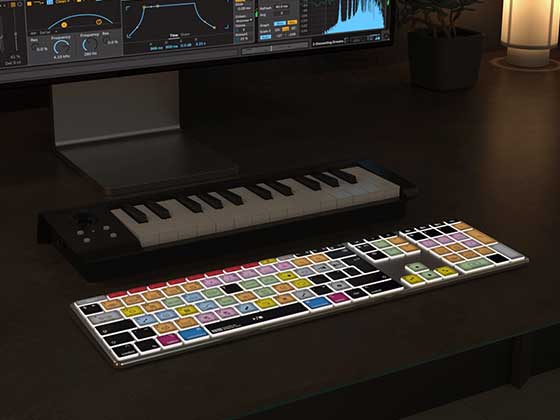
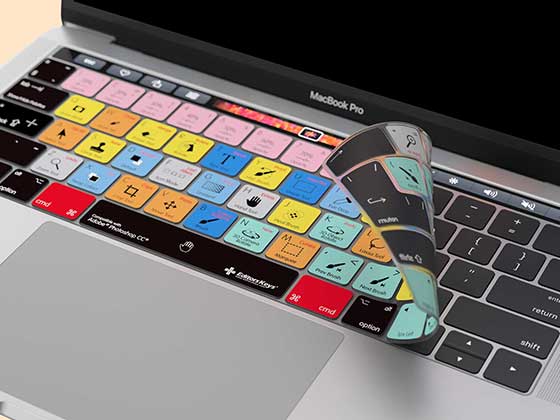

If you're looking for a way to put your own design or company logo on a keyboard, Editors Keys have made it easy! Here you can create your own custom printed keyboard, combining professional software shortcuts with your own personal branding.
You can add your own logo to any of our AB10 editing keyboards, choose from a range of software shortcut layouts and even add a second logo or custom text to the right Shift key. You don't need any graphic design experience, either! Our online keyboard builder lets you upload your logo, customise your keyboard and download a proof before placing an order.
Here's how to create your own branded keyboard and what you need to know before getting started.
What Is a Custom Printed Keyboard?
A custom printed keyboard is a keyboard that's been personalised with your own branding, company logo, text or design. Rather than using a standard off-the-shelf keyboard, you can create something that reflects your business or personal brand.
At Editors Keys, we specialise in shortcut keyboards designed for creative software. Our keyboards feature useful software shortcuts printed directly onto the keys, helping video editors, music producers and other creative professionals work more efficiently.
By combining these software-specific layouts with your own branding, you get a keyboard that's both practical and personalised.

Which Keyboards Can You Customise?
We offer custom logo printing on two of our AB10 keyboard models: the AB10 Core and AB10 Air. Both can be customised with your own branding and are available with our different software shortcut layouts.
AB10 Core – Wired Custom Logo Keyboard
The AB10 Core is our wired USB-C keyboard. It's a great choice for studios, editing suites and businesses that prefer a straightforward wired setup.
You can add your company logo while choosing the software layout that best suits your team's workflow. It's particularly useful for shared editing workstations where having a dedicated shortcut keyboard can help editors work more efficiently.
A logo customised Editors Keys AB10 Core keyboard starts at £174.99
AB10 Air – Wireless Custom Logo Keyboard
If you prefer a wireless setup, the AB10 Air gives you the same custom branding options in a wireless keyboard.
It's a good choice for home studios, mobile editing setups and businesses that want to keep their desks tidy without additional cables. Both models offer a professional-looking way to combine your branding with the shortcuts your team actually uses.
A logo customised Editors Keys AB10 Air starts at £194.99
Final prices can vary based on customisation so be sure to check prices before ordering!

What Can You Print on a Custom Keyboard?
There are a few ways to personalise your design and make the keyboard truly your own.
Add Your Company Logo
The main customisation option lets you upload your own logo and have it printed onto your chosen AB10 keyboard. This could be your company logo, recording studio branding, production company identity or even a personal logo if you're ordering a keyboard for yourself.
It's a simple way to create a branded keyboard that looks like it belongs in your business rather than something taken straight off a shop shelf.
Add a Second Logo or Custom Text
If you want to take your customisation a bit further, then you can also choose an additional option to have a second logo or custom text printed on the right Shift key.
This gives you another area to personalise. You could use it for a website address, studio name, secondary brand logo or another piece of text that means something to your business.
What Do I Need to Supply for Custom Keyboard Printing?
Before designing your keyboard, it's worth having your company logo or artwork ready.
For the best results, we'd recommend uploading a PNG, a PDF, or an Illustrator file. Be sure to use the highest quality version of your logo rather than a small, low-resolution image taken from a website or screenshot. This helps ensure your branding looks as clear as possible when printed. JPEG files are okay, but the background can't be cut out automatically.
If you have different versions of your company logo, consider which one will work best on a keyboard. A simpler logo or word-mark can sometimes be easier to recognise in a smaller printing area.
You can upload your artwork directly through our online builder and download a proof to check your design before placing an order.
Choose Your Software Shortcut Layout
One of the biggest advantages of an Editors Keys custom logo keyboard is that you don't have to sacrifice useful software shortcuts to get your branding. You can choose from our available software layouts, depending on the keyboard and your requirements.
Some of our most popular and best selling editing programs are:
-
Adobe Premiere Pro
-
Final Cut Pro
-
DaVinci Resolve
-
Avid Media Composer
-
Logic Pro
-
Pro Tools
-
Ableton Live
This means you can create a custom keyboard for video editors, music producers and other creative professionals without losing the shortcuts that make these keyboards useful.
For example, a video editing studio could order several branded Premiere Pro keyboards for its editing team, while a music production company might prefer Logic Pro or Ableton Live layouts. It's also worth considering if you're ordering keyboards for multiple members of staff. You can choose software layouts that match the applications your team uses every day.

How to Design Your Own Custom Keyboard Online
You don't need to contact a designer or send us complicated artwork instructions to get started. We've made the process straightforward with our online custom keyboard builder.
You can experiment with different designs, upload your logo and download a proof before deciding whether to order.
Here's how to get started.
Step 1 – Visit the Custom Keyboard Builder
Head over to the Editors Keys Custom Logo Keyboard Builder.
This is where you can start designing your personalised keyboard and explore the available customisation options.
Step 2 – Choose Your Keyboard
Select whether you'd prefer the AB10 Core wired keyboard or the AB10 Air wireless model.
Think about where the keyboard will be used and whether a wired or wireless setup makes more sense for your workstation.
Step 3 – Select Your Software Layout
Choose the software shortcut layout you want printed on the keyboard. Select the application that best suits your workflow.
Step 4 – Upload Your Logo
Upload your company logo using the online builder and position it within the available design area. You can also explore the additional option for a second logo or custom text on the right Shift key.
Step 5 – Download Your Proof
Before placing an order, you can download a proof of your design.
This is particularly useful if you're ordering keyboards for a business or studio and want someone else to check the branding before committing.
Have a play around with the builder, try different options and see what your finished keyboard could look like.
Ready to start designing? Visit editorskeys.com/logo and create your own custom printed keyboard.

Custom Keyboards for Businesses, Studios and Corporate Gifts
A personalised keyboard can be useful, particularly for businesses working in video production, audio, broadcasting and digital media.
Video Production Companies
If you run a video production company, your editing workstations are an important part of your business. A branded Premiere Pro, Final Cut Pro or DaVinci Resolve keyboard is a practical addition to your editing suites.
You could order several keyboards for your editing team, giving each workstation a consistent personal look while providing editors with useful shortcuts.
Recording Studios and Music Producers
For recording studios, a branded Logic Pro, Pro Tools or Ableton Live keyboard is a natural fit.
It gives your studio another opportunity to display its branding while providing engineers and producers with all the most useful shortcuts for the chosen DAW during recording, mixing and production sessions.
Corporate Gifts and Gifts for Video Editors
A custom logo keyboard makes an interesting corporate gift, particularly for businesses working in video production, audio or digital media.
It's also worth considering if you're searching for gifts for video editors or music producers. Rather than another generic branded notebook or mug, you can give someone something personal that they'll actually use at their workstation.
Custom keyboards could also be an interesting option for staff welcome packs, studio openings, industry events and client gifts.

Delivery, Warranty and Ordering
Our custom logo keyboards are hand packed by the Editors Keys team, dispatched within 7 days and include a 1-year warranty.
You can design your keyboard online, download a proof and check your branding before placing an order. This makes it a straightforward option whether you're ordering a single personalised keyboard or arranging equipment for a creative team.
For larger business requirements, it's worth getting in touch to discuss your project and make sure you've chosen the right keyboards and software layouts.
Design Your Own Custom Logo Keyboard with Editors Keys
With Editors Keys, you can combine your company logo with a dedicated software shortcut layout, choose between wired and wireless models and even add a second logo or custom text to the right Shift key.
You can design everything online and download a proof before ordering, so there's no need to commit to a design until you're happy with how it looks.
Have a go yourself and see what you can create. Visit editorskeys.com/logo to start designing your own custom printed keyboard.
Frequently Asked Questions About Custom Printed Keyboards
Can you print a company logo onto an existing keyboard?
Yes. Editors Keys offers custom logo printing on the AB10 Core Wired and AB10 Air Wireless keyboards. You can upload your own company logo using our online builder and preview your design before ordering.
Can I order custom printed keyboards in bulk for my business?
Custom logo keyboards are suitable for businesses looking to brand multiple workstations or provide keyboards to staff and clients. For larger requirements, get in touch with mark.b@editorskeys.com to discuss your project and ordering options.
What file format does my logo need to be for keyboard printing?
We require all logos uploaded as either a PNG, a PDF, or an Illustrator file, so we can print them at the highest quality. JPEGs are okay, as long as you understand the background cannot be cut out automatically. Our keyboard builder will notify you of any issues.
Can I create a completely bespoke keyboard with my own shortcuts?
Not yet, but this is coming soon! We're working out the kinks and hope to have it available on the builder. For now, you can simply upload your logo or brand to the spacebar to create a keyboard that's truly your own