Colour grading is one of the most effective ways to improve the appearance of video footage. Whether you are working on a professional film, a YouTube video, a music video or a commercial project, the right colour grade can help your footage look more polished, consistent and visually engaging. A good LUT pack can make a significant difference to the grading process, particularly when you are working with LOG footage that requires careful colour correction before it is ready for delivery.
Editors Keys offers a range of LUT packs designed for different cameras, LOG profiles and creative styles. From Canon C-LOG and DJI D-LOG conversions to vintage film-inspired looks, these collections give videographers a practical way to develop a consistent visual style without spending hours creating every colour adjustment from scratch.
In this guide, we explore five of the best Editors Keys LUT packs for colour grading, explain what each collection does, and discuss how to choose the right LUTs for your camera and editing software. We will also look at how the right editing accessories, including shortcut keyboards and silicone keyboard covers, can help you work more efficiently when applying LUTs and finishing your projects.
What is a LUT and how does it improve video footage?
A LUT, or Look-Up Table, is a set of instructions that changes the colour and tonal values of an image. In video editing, LUTs are commonly used to transform flat-looking LOG footage into a more natural image, apply a cinematic colour grade, or create a particular visual mood. A LUT can adjust the relationship between colours, brightness and contrast, allowing a carefully designed look to be applied consistently across multiple clips.
Many modern cameras record footage using LOG profiles such as Canon C-LOG, DJI D-LOG and Insta360 I-LOG. These profiles are designed to preserve a wide range of highlight and shadow detail, giving editors greater flexibility when correcting exposure and colour. However, LOG footage often looks washed out, low in contrast and lacking in saturation when viewed before grading. This is normal and does not mean that the camera has produced poor-quality footage.

A compatible technical LUT can transform LOG footage into a more conventional colour space, such as Rec.709, making it easier to judge exposure, skin tones and overall colour balance. Creative LUTs can then be used to introduce a distinctive look, such as a warm vintage film aesthetic, a cooler cinematic palette or a more stylised contrast curve.
The important distinction is that a technical conversion LUT and a creative LUT serve different purposes. A technical LUT helps bring footage into a usable viewing space, while a creative LUT is designed to change the appearance and mood of the image. Some LUT packs are designed to perform both functions, but you should always check the specific camera profile and colour space for which a LUT was created.
How to choose the best LUT pack for your camera
Before purchasing a LUT pack, identify the camera you are using and the LOG profile in which your footage was recorded. This is one of the most important steps in achieving accurate colour grading, because a LUT designed for Canon C-LOG may not produce the intended results when applied to DJI D-LOG or another camera's LOG footage.
You should also consider whether you want a technical conversion, a cinematic look or a collection of different creative styles. If you are grading footage from a professional camera, a pack with a dedicated LOG-to-Rec.709 conversion can provide a useful starting point. If you are working on music videos, documentaries or branded content, a creative collection may offer more flexibility when developing a particular visual identity.
Compatibility with your editing software is another important consideration. Editors Keys LUT packs are designed for use with popular video editing applications, including Final Cut Pro, Adobe Premiere Pro, DaVinci Resolve and LumaFusion, depending on the collection. Most professional editing software supports the .cube LUT format, which makes it possible to use LUTs across different programmes when the software supports that format.
1. Canon C-LOG 3 LUT Pack
The Canon C-LOG 3 LUT Pack is designed for videographers working with Canon cameras that record using the C-LOG 3 profile. Canon C-LOG 3 is widely used by filmmakers, commercial videographers, content creators and production teams who want to retain a wide dynamic range while maintaining a flexible workflow during post-production.
One of the main benefits of this collection is its dedicated C-LOG 3 to Rec.709 conversion LUT. This provides a starting point for transforming flat LOG footage into a more natural-looking image, allowing you to begin the creative grading process with a more familiar colour and contrast balance.
The collection contains 13 LUTs, including the C-LOG 3 conversion and a range of creative grading options. These give editors the flexibility to work with different types of footage and visual styles, whether they are creating a cinematic sequence, grading a talking-head video or working on a commercial production.

What does the Canon C-LOG 3 LUT Pack do?
The technical conversion LUT is intended to help transform Canon C-LOG 3 footage into a Rec.709-style image. This can make it easier to assess exposure, contrast and colour before applying additional adjustments. The creative LUTs allow you to explore different visual styles without manually recreating every adjustment.
For example, a videographer filming a short film on a Canon mirrorless camera may record using C-LOG 3 to preserve detail in bright skies and darker areas of the scene. After importing the footage into Premiere Pro, DaVinci Resolve or Final Cut Pro, the conversion LUT can be used as a starting point. The editor can then fine-tune the exposure, white balance, saturation and skin tones before choosing a creative look from the collection.
This approach can save time when grading large numbers of clips, particularly when the footage was captured in similar lighting conditions. It also makes it easier to develop a consistent appearance across an entire project.

Canon C-LOG 3 LUT Pack features
The collection is designed for Canon C-LOG 3 footage and includes 13 LUTs, including a C-LOG 3-to-Rec.709 conversion. It is compatible with Final Cut Pro, Adobe Premiere Pro, DaVinci Resolve and LumaFusion, making it useful for editors working across different platforms.
If you regularly shoot Canon C-LOG 3 footage and want a practical starting point for colour grading, this collection provides a selection of technical and creative LUTs that can be integrated into an existing editing workflow.

2. DJI D-LOG LUT Collection
DJI cameras are popular with videographers who need lightweight, portable equipment for travel, filmmaking, aerial footage and content creation. Models that support DJI D-LOG provide a way to capture footage with greater flexibility for colour correction and grading, particularly when working in challenging lighting conditions.
The Editors Keys DJI D-LOG LUT Collection is designed for editors who want to bring DJI LOG footage into a more usable colour space and explore a selection of creative looks. It is a useful choice for anyone working with DJI footage who wants a consistent approach to colour grading without having to build every look manually.

Why use LUTs with DJI D-LOG footage?
D-LOG footage can appear flat and desaturated when it is first imported into an editing programme. This is because the LOG profile is designed to preserve image information for post-production rather than produce a finished image straight out of the camera.
A compatible LUT can provide a more natural starting point by transforming the footage into a conventional viewing space. This allows you to assess colour and contrast more easily, while still retaining the ability to make manual corrections afterwards.
The DJI D-LOG collection can be particularly useful for drone videographers who need to match footage captured across different locations. A consistent grading approach can help aerial shots, establishing shots and handheld footage sit together more naturally within the same edit.

DJI D-LOG LUT Pack features
The collection is designed for DJI D-LOG footage and provides a range of grading options for different projects. It is compatible with popular video editing software, including Final Cut Pro, Adobe Premiere Pro, DaVinci Resolve and LumaFusion, allowing you to work with LUTs in the programme you already use.
For drone operators and videographers who regularly work with DJI LOG footage, a dedicated LUT collection can make the colour grading process more straightforward, particularly when you need to process a large number of clips efficiently.

3. Insta360 I-LOG LUT Collection
Insta360 cameras are widely used for action footage, travel videos, immersive content and creative filmmaking. Their compact design makes them useful for capturing unusual camera angles, moving subjects and footage that would be difficult to obtain with a larger camera system.
The Editors Keys Insta360 I-LOG LUT Collection is designed for videographers who record using Insta360 I-LOG and want a practical way to improve the appearance of their footage during post-production. The collection provides creative grading options for editors who want to move beyond the flat appearance of LOG footage and develop a more consistent visual style.

What makes Insta360 I-LOG footage different?
Insta360 cameras are often used in situations where the camera moves quickly, the lighting changes throughout the shot or the footage is intended to be combined with other camera angles. These conditions can make colour consistency particularly important.
Using a compatible LUT as part of the grading workflow can help you establish a starting point for colour correction and creative grading. For example, a travel filmmaker may use an Insta360 camera to capture action footage outdoors, then combine it with footage from a conventional mirrorless camera. Applying appropriate technical and creative adjustments can help bring the different sources closer together.
A LUT should not be expected to solve every colour problem automatically. Exposure, white balance and differences between camera sensors still need to be considered, but a dedicated collection can provide useful options for developing the overall look of a project.

Insta360 I-LOG LUT Pack features
This collection is intended for Insta360 I-LOG footage and offers creative LUT options for videographers working with Insta360 cameras. It is a useful addition to a grading workflow for action sports, travel videos, social media content and other projects where Insta360 footage forms an important part of the final edit.
If you are looking for LUTs that are designed around your Insta360 workflow, this collection provides a way to explore different colour grading styles while working within your existing editing software.

4. Editors Keys Vintage LUT Collection
The Editors Keys Vintage LUT Collection is designed for videographers who want to introduce a film-inspired aesthetic to their footage. Unlike camera-specific technical LUTs, this collection focuses on creative grading and is intended to help you achieve a particular mood, texture and colour palette.
Vintage-inspired colour grading is popular in music videos, fashion films, documentaries, wedding films and branded content. It can help footage feel warmer, softer or more nostalgic, depending on the look you choose and how you combine it with other grading adjustments.

What can vintage LUTs do for your footage?
A vintage LUT can change the appearance of footage by adjusting colour balance, contrast and tonal relationships. Depending on the look, this may create warmer highlights, muted colours, deeper shadows or a more film-inspired overall palette.
For example, a wedding videographer may use a vintage look to create a softer, nostalgic feel in a sequence of outdoor shots. A music video editor may choose a more stylised LUT to complement the production's lighting and art direction. A documentary filmmaker might use a subtle film-inspired look to help establish a particular period or atmosphere.

The most effective use of a vintage LUT often involves making small adjustments after application. Reducing the LUT's intensity, correcting skin tones and balancing exposure can help preserve a natural appearance while retaining the character of the look.
Vintage LUT Collection features
The collection provides creative vintage-style LUTs that can be used across a range of compatible video footage. It is intended for editors who want to explore film-inspired colour grading without having to manually build every look from scratch.

5. Editors Keys Cinematic iPhone LUT Pack
The Editors Keys Cinematic iPhone LUT Pack is designed for videographers and content creators who want to give iPhone footage a more cinematic appearance. Modern smartphones are capable of producing impressive video, making them a practical choice for YouTube creators, filmmakers, musicians, travel videographers and anyone who wants to capture high-quality footage without carrying a larger camera system. The right colour grade can help bring that footage together into a more polished and visually consistent final edit.
This collection is a useful option for anyone who records video on an iPhone and wants to explore a film-inspired look during post-production. Whether you are creating a music video, a short film, a travel project or social media content, cinematic LUTs can provide a starting point for developing the colour palette and mood of your footage.

What does the Cinematic iPhone LUT Pack do?
A cinematic LUT can change the appearance of your footage by adjusting colour, contrast and tonal relationships. Depending on the look you choose, this may help create a more film-inspired image, with a distinctive colour palette that complements the subject and atmosphere of your video.
For example, a filmmaker shooting a short film on an iPhone may want to give outdoor scenes a warmer, more cinematic appearance. A music video editor might use a creative LUT to help establish a consistent visual style across a sequence of shots. Applying a LUT provides a useful starting point for these adjustments, allowing you to refine the result with your editing software's colour grading tools.
The collection can also be useful when you want to experiment with different looks without manually creating every colour adjustment from the beginning. You can compare the available options, choose a look that suits your project and then fine-tune the result to match your creative vision.

Cinematic iPhone LUT Pack features
The Editors Keys Cinematic iPhone LUT Pack is designed for iPhone video footage and provides cinematic colour grading options for mobile filmmakers and content creators. It is available from the product page.
If you regularly shoot video on an iPhone and want to develop a more cinematic visual style, this collection is worth exploring alongside your existing colour grading workflow. As with any creative LUT, the final result will depend on the original footage, exposure, white balance and the adjustments you make after applying the LUT.

Which LUT pack should you choose?
The best LUT pack for your project depends on your camera, LOG profile and the visual style you want to achieve. If you record Canon C-LOG 3 footage, the Canon C-LOG 3 LUT Pack is designed to provide a dedicated conversion and creative grading options. DJI users can explore the DJI D-LOG LUT Collection, while Insta360 users can choose a collection designed for I-LOG footage.
If you are more interested in creating a film-inspired look, the Editors Keys Vintage LUT Collection is a useful option to explore. Creative LUT packs are also worth considering if you want a broader selection of grading styles that can be used across different types of footage.
Regardless of the collection you choose, it is important to remember that LUTs work best as part of a wider colour grading workflow. Correct exposure and white balance first, then use the LUT to develop the desired look. This approach gives you greater control over the final image and helps you achieve a more consistent result.

Improve your colour grading workflow with Editors Keys editing keyboards
Colour grading is only one part of the post-production process. Videographers and editors also spend a considerable amount of time cutting footage, moving between clips, applying effects and navigating their editing software. The right editing accessories can make these tasks more efficient, particularly when you are working on long projects.
Editors Keys shortcut editing keyboards are designed for video editors who want to improve their workflow and make commonly used keyboard shortcuts easier to remember. Each keyboard features editing shortcuts mapped out onto the keys, allowing you to see the functions you use most often without having to memorise every command.
The AB10 Air and AB10 Core are Editors Keys' wireless and wired USB-C backlit shortcut editing keyboards. Both are designed to support faster editing and easier shortcut memorisation, making them useful for videographers working with popular editing software.

AB10 Air Wireless Backlit Shortcut Editing Keyboard
The AB10 Air is a wireless shortcut editing keyboard designed for editors who want the flexibility to work without a cable. It features backlit keys with editing shortcuts mapped onto the keyboard, making it easier to identify commonly used commands during a project.
For editors who frequently move between different workstations or prefer a more flexible desk setup, a wireless keyboard can help keep the workspace tidy while providing quick access to editing shortcuts. The mapped keys can also be useful for anyone learning a new editing programme or trying to improve their shortcut knowledge.

Silicone shortcut keyboard covers
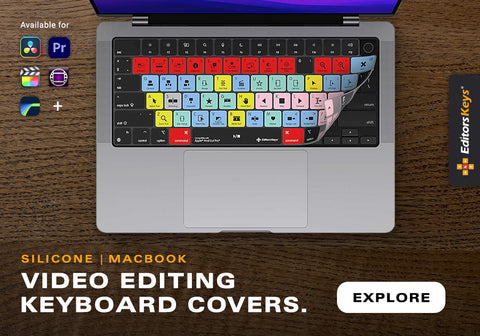
Editors Keys also offers silicone shortcut keyboard covers for popular editing software. These covers fit over compatible keyboards and feature shortcuts printed directly onto the keys, making them a practical option for editors who want to improve shortcut memorisation without replacing their existing keyboard.
A silicone cover can also help protect the keyboard from dust and light spills, while providing a clear visual reference for commonly used editing commands. This can be particularly useful for videographers who spend long hours working in editing software and want to make their workflow more efficient.
Final thoughts
The right LUT pack can make a significant difference to the colour grading process, particularly when working with LOG footage or developing a consistent creative style. Editors Keys offers camera-specific collections for Canon C-LOG 3, DJI D-LOG and Insta360 I-LOG, as well as vintage-inspired and creative LUT packs for editors who want to explore different looks.
When choosing a LUT collection, start by checking your camera's LOG profile and the type of grading you want to achieve. A compatible technical conversion can provide a useful foundation, while creative LUTs can help you develop the mood and colour palette of your final project. Taking the time to refine the result with manual colour adjustments will help you maintain control over the final image.
If you want to improve the wider editing process as well, Editors Keys shortcut keyboards and silicone keyboard covers provide a practical way to access commonly used editing commands and improve shortcut memorisation. Explore the full range of LUT packs and shortcut editing accessories at www.editorskeys.com to find tools that suit your video editing workflow.