Every professional video editor has one thing in common: Speed.
Not because they rush their work, but because they eliminate unnecessary movements, wasted clicks and repetitive tasks. The faster you can perform the technical side of editing, the more time you have to focus on what actually matters – storytelling, pacing, creativity and producing a better final film.
Whether you're editing YouTube videos, documentaries, weddings, short films or social media content, learning keyboard shortcuts is one of the most valuable investments you can make in your editing workflow.
Many editors spend thousands of pounds upgrading cameras, computers and storage, yet overlook one of the simplest ways to become dramatically more efficient. Here's why keyboard shortcuts can completely transform the way you edit.
Every Click Adds Up
Think about how many actions you perform during a typical editing session.
You might:
-
Cut clips
-
Ripple delete unwanted footage
-
Zoom in and out of the timeline
-
Switch between tools
-
Add markers
-
Play forwards and backwards
-
Copy and paste clips
-
Undo mistakes
-
Trim edits
-
Enable snapping
-
Render previews
-
Add transitions
-
Move between windows
Now imagine performing each of those actions hundreds of times throughout a project.
If you're constantly moving your mouse away from the timeline, opening menus, searching through toolbars and clicking commands, those extra seconds quickly become minutes. Minutes become hours. Hours become entire working days lost over the course of a year.
Mouse Navigation Interrupts Your Flow
Editing is a creative process, and the best editing sessions happen when you're fully immersed in the footage and making instinctive creative decisions. Unfortunately, constantly stopping to hunt through menus breaks that concentration.
Instead of thinking:
"This shot should cut slightly earlier..."
Your brain switches to:
"Where is Ripple Delete again?"
Or:
"Which menu is the Speed tool under?"
Those little interruptions might seem insignificant, but they repeatedly pull you out of your creative rhythm. Keyboard shortcuts remove those interruptions almost entirely. Instead of searching, you simply press a key. The edit happens instantly. Your attention stays exactly where it should be—on the story.
Dropdown Menus Were Never Designed for Speed
Every editing application includes dropdown menus, they're fantastic when you're learning a piece of software or looking for features you've never used before. However, they're rarely the fastest way to perform common actions.
Imagine wanting to split a clip - Instead of pressing a single keyboard shortcut, you may find yourself:
-
Moving the mouse away from the timeline
-
Clicking Edit
-
Finding the correct command
-
Clicking it
-
Returning to the timeline
It might only take three or four seconds.
But repeat that action 300 times during a project and you've spent around 20 minutes performing one simple task that could have taken seconds using a shortcut. Multiply that across every edit, trim, delete, zoom and playback command throughout an entire project and the difference becomes enormous.
Small Time Savings Create Huge Productivity Gains
Professional editors don't necessarily work faster because they edit quicker, they work faster because they remove unnecessary actions.
Saving just one second per edit doesn't sound impressive until you realise you might perform several thousand editing actions during a single project. Those tiny time savings compound remarkably quickly.
Editors who rely heavily on shortcuts often discover they can finish projects significantly faster than before—not because they're rushing, but because they're spending almost every second actually editing instead of navigating software.

Keyboard Shortcuts Become Muscle Memory
One of the biggest advantages of shortcuts is that eventually you stop thinking about them altogether. After enough repetition, your hands instinctively know where the commands are.
You no longer think:
"I need to press this shortcut."
Instead, your fingers simply perform the action.
This is known as muscle memory, and it's exactly how experienced editors appear to work so effortlessly. They aren't consciously remembering dozens or even hundreds of shortcuts. Their hands already know them. Once you reach this stage, editing feels dramatically more natural.
You'll Spend More Time Being Creative
Whether you're creating cinematic travel films, fast-paced YouTube videos or commercial content, the software should almost disappear into the background. Keyboard shortcuts help make that happen.
Instead of concentrating on operating the program, you can focus entirely on:
-
Rhythm
-
Emotion
-
Storytelling
-
Timing
-
Music
-
Sound design
-
Colour
-
Creative transitions
The less mental energy spent navigating menus, the more you have available for making creative decisions.

They're Essential for Professional Workflows
Visit almost any professional editing studio and you'll notice something immediately.
Editors rarely rely solely on the mouse.
Instead, both hands stay active.
One hand controls the mouse or graphics tablet.
The other remains on the keyboard.
This two-handed workflow allows editors to navigate timelines, trim clips, zoom, switch tools and perform dozens of actions without constantly moving between devices.
It's significantly faster and far more efficient.
Learning Shortcuts Doesn't Have to Be Difficult
Many people avoid learning shortcuts because they think there are simply too many. Modern editing software can contain hundreds of keyboard commands. That sounds overwhelming, but the reality is you don't need to memorise every shortcut overnight. Start with the commands you use every day.
For example:
-
Cut
-
Undo
-
Copy
-
Paste
-
Delete
-
Zoom
-
Play/Pause
-
Ripple Delete
-
Blade Tool
-
Selection Tool
Once those become second nature, gradually add more.
Over time your shortcut vocabulary naturally grows.
Make Learning Easier with Editors Keys Shortcut Keyboards
One of the easiest ways to learn shortcuts is by using an editing keyboard where every shortcut is clearly labelled. Rather than trying to remember dozens of key combinations from memory, the shortcuts are displayed directly on the keyboard itself.
This means you're constantly learning while you work. Each time you look down, you're reinforcing where every command lives. After a surprisingly short amount of time, many editors find they no longer need to look at the keyboard at all. The shortcuts have become second nature!
Edit Faster with the Editors Keys AB10 Core & AB10 Air
Whether you prefer the reliability of a wired connection or the freedom of working wirelessly, the Editors Keys AB10 Core and AB10 Air are designed to help you edit faster and more efficiently.
The AB10 Core features a premium USB-C wired connection for reliable, low-latency performance, making it ideal for long editing sessions where responsiveness is key. If you prefer a cleaner, cable-free workspace, the AB10 Air offers the same shortcut-focused experience in a sleek wireless design that's perfect for modern studios, hybrid workspaces or editing on the move.

Both keyboards feature adjustable backlit keys, making them easy to use in darker editing suites or low-light environments. More importantly, every key is professionally colour-coded and labelled with the keyboard shortcuts for your chosen editing software, putting your most-used commands right at your fingertips.
Instead of searching through menus, checking online guides or keeping shortcut cheat sheets nearby, the shortcuts are always visible as you work. This not only speeds up your editing but also helps reinforce muscle memory, allowing you to naturally memorise the shortcuts over time. Whether you're editing in Final Cut Pro, Adobe Premiere Pro, DaVinci Resolve or another supported editing application, the Editors Keys AB10 Core and AB10 Air are designed to streamline your workflow, reduce unnecessary clicks and help you spend more time editing and less time navigating menus.
Turn Your Existing Keyboard into an Editing Keyboard
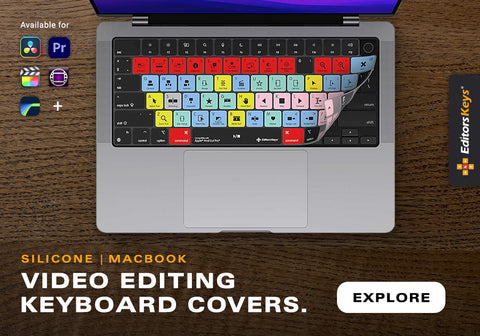
Already love your current keyboard? Editors Keys also offers an extensive range of silicone editing keyboard covers.
These flexible covers fit over compatible MacBook and Apple keyboards, instantly transforming them into professional shortcut keyboards. Each cover displays the keyboard shortcuts for your chosen editing software, making it far easier to learn commands as you work.
Because they're lightweight and portable, you can simply slip one into your laptop bag and continue editing wherever inspiration takes you. Whether you're working in a café, studio, office, university or while travelling, your editing shortcuts travel with you.
More Than Just Shortcuts
Editors Keys silicone keyboard covers also provide practical protection for your keyboard.
The premium silicone layer helps shield your keyboard from:
-
Dust
-
Dirt
-
Crumbs
-
Everyday wear
-
Accidental liquid spills
For editors who regularly work in busy studios, production offices or while travelling, this added protection can help keep your keyboard cleaner and looking newer for longer. It's a simple upgrade that improves both productivity and peace of mind.
Compatible with Your Favourite Editing Software
Editors Keys produces shortcut keyboards and keyboard covers for many of today's most popular creative applications, helping editors work faster regardless of their preferred workflow.
Whether you're cutting feature-length films, producing YouTube videos, editing podcasts or creating social media content, having your most-used shortcuts directly on your keyboard can dramatically improve efficiency.
Instead of memorising hundreds of commands from manuals or online guides, you learn naturally through daily use.

Why Every Editor Should Learn Keyboard Shortcuts
Learning keyboard shortcuts isn't about showing off. It's about removing friction from your workflow. The less time you spend searching through menus, the more time you spend creating.
Over weeks, months and years, those saved seconds become hours of additional editing time. You'll work more efficiently, maintain better creative focus and complete projects faster without compromising quality. Whether you're just starting your editing journey or you've been editing professionally for years, mastering keyboard shortcuts is one of the simplest ways to become a better editor.
And with an Editors Keys shortcut keyboard or silicone keyboard cover, learning those shortcuts becomes faster, easier and far more enjoyable.
Ready to Edit Faster?
If you're looking to speed up your workflow, improve your editing efficiency and learn keyboard shortcuts naturally as you work, explore the full range of Editors Keys shortcut keyboards and silicone keyboard covers.
From the backlit AB10 Core wired editing keyboard to the wireless AB10 Air, as well as our popular silicone shortcut covers for MacBooks and Apple keyboards, there's a solution for every editor. Browse the collection today and discover how the right keyboard can help you spend less time navigating menus—and more time creating incredible videos.