

Most people who ask me whether they should buy DaVinci Resolve Studio don't need it. There, I said it.
We've been making shortcut keyboards for editors since 2005, so I get this question a lot. Usually from someone who's just finished their first few projects in the free version, hit something that's greyed out, and wondered if $295 is the fix. Sometimes it is. Often it isn't.
So here's where the paywall actually sits in Resolve 21, who genuinely needs to pay, and what I'd spend the money on instead if you don't.

The free version is not a demo
This is the bit people miss. Free Resolve isn't a trial and it doesn't watermark anything. You get the full Edit, Cut, Colour, Fusion and Fairlight pages, and you can export up to UHD (3840×2160) at 60fps for as long as you like.
Multi-user collaboration and the HDR grading tools are in there too. Both used to be Studio-only, and plenty of comparison articles still haven't caught up.
Blackmagic gives it away because it sells cameras and hardware. Good for them, good for us!
Where you actually hit the wall
Studio is a one-off $295, no subscription, and Blackmagic has never charged existing owners for a major upgrade. Here's what that buys you.
| What you need | Free | Studio |
|---|---|---|
| Noise reduction (temporal, spatial, UltraNR) | None | Yes |
| Export resolution and frame rate | Up to UHD, 60fps | Up to 32K, 120fps |
| 10-bit encoding | No, 8-bit only | Yes |
| Hardware H.264/H.265 encode and decode | No | Yes |
| Multiple GPUs | No | Yes |
| AI tools (Magic Mask, IntelliSearch, Super Scale, text-based editing) | No | Yes |
| Dolby Vision and HDR10+ deliverables, HDR scopes | No | Yes |
| DCP and IMF export | No | Yes |
| Python scripting and the external API | No (removed in 21.1) | Yes |
If I had to pick the one thing that sends people to the checkout, it's noise reduction. The free version doesn't have a weaker version of it, it has nothing. If you shoot in low light on a small sensor, that alone probably settles it.
The second big one is delivery. UHD is 3840 pixels wide, but cinema DCI 4K is 4096. Anything for a festival, anything above 60fps, or any client asking for 10-bit masters means Studio.
One more worth knowing. As of Resolve 21.1, Python scripting no longer runs in the free version at all. Blackmagic said people were using it to hack Studio features into the free app. If you run scripts or automate renders, that's now a hard line.

Who should keep their money
If you're learning Resolve, stay on free. Nothing about learning to cut or grade sits behind the paywall.
If you make YouTube videos, social content or corporate work and deliver at UHD 60 or below, stay on free. Blackmagic drew the line right where most of that work lives, and I don't think that's an accident.
If you're on Windows and the only reason you're looking is that HEVC files won't import, don't buy Studio. That's a missing Windows codec, and Microsoft's HEVC Video Extensions cost about a dollar in the Microsoft Store.
And nobody should buy it to feel more professional. I've never once heard a client ask which version rendered their film.
So what about the Speed Editor?
The DaVinci Resolve Speed Editor is about $435 at US retailers right now, and it comes with a Studio activation key in the box. Take off the $295 licence and you're paying roughly $140 for the hardware.
If you already know you need Studio, that's a good deal and I'd tell you to take it. Credit where it's due.
But look at it the other way round. If you're staying on the free version, which is most of you, then over two-thirds of that price is a licence you'll never use. What's left is a compact controller built mainly around the Cut page, with a search dial and a set of edit keys. Lots of editors love it. Plenty of others bought it for the licence and it now lives in a drawer.
It also doesn't replace your keyboard. You still need something to type with, name bins and use every shortcut that isn't on those few dozen keys.
The cheaper way to edit faster
This is obviously where I'm biased, so I'll keep it to the facts.
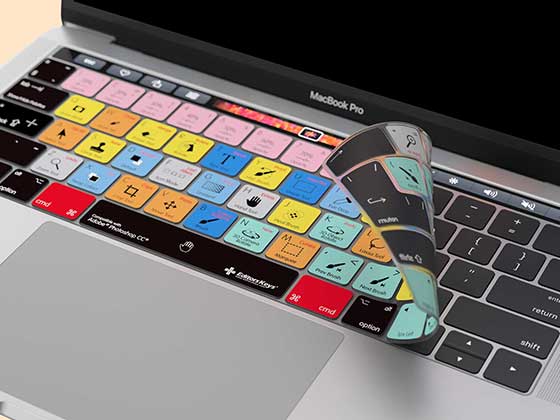
Our AB10 DaVinci Resolve keyboard is a full keyboard with over 150 Resolve shortcuts printed on the keys, colour-coded by what they do. Edit page, Colour, Fairlight, it's all there. The normal letters are on every key as well, so it's the only keyboard on your desk.
It costs £159.99, a fraction of the Speed Editor, and none of that money goes on a licence you don't need.
- AB10 Air is wireless. It pairs with up to three devices and lasts up to three months on a charge with the backlight off.
- AB10 Core is wired over USB-C. Nothing to charge, no lag.
- Both are fully backlit with three brightness levels, which matters more than you'd think in a dark grading room.
- Mac or Windows versions, in UK or US layouts, and it works with Resolve 18 right up to 21.
The honest trade-off: there's no jog wheel. If scrubbing with a dial is how you like to work, the Speed Editor does something the AB10 doesn't. But if what slows you down is hunting for shortcuts, having every one of them in front of you fixes that for good. And you build the muscle memory as you go.
My take
Need noise reduction, DCI 4K, 120fps, 10-bit masters or scripting? Buy Studio, and if you fancy a jog wheel, get it through the Speed Editor bundle.
For everyone else, the free version is the best deal in editing software. Keep the $295 and spend a bit of it on something that makes you faster every single day. I'd say a keyboard, but then I would.
Have a look at the AB10 range here, and if you're not sure which version of Resolve you need, drop your setup in the comments and I'll give you my honest answer.
Prices and features checked against Resolve 21.1 in October 2026.
