
Reverb is one of the most important effects in music production, helping to add depth, atmosphere and space to recordings. Whether you're mixing vocals, recording guitars, producing electronic music or working on a cinematic soundtrack, the right reverb plugin can dramatically change the character of a track.
Although most DAWs, including Logic Pro, Ableton Live, FL Studio, Cubase and Pro Tools, come with their own built-in reverb effects, third-party VST plugins often offer more detailed controls, distinctive sounds and additional creative possibilities. Some recreate the character of classic studio hardware, while others use modern algorithms to produce enormous atmospheric spaces, realistic room reflections and smooth reverb tails.
We've selected five of the best reverb plugins worth considering in 2026, including professional paid options and a completely free plugin. Each offers something different, whether you're looking for realistic studio spaces, vintage digital reverb or experimental effects for sound design.

1. Valhalla VintageVerb – Best Overall Reverb Plugin
Created by: Valhalla DSP
Price: $50 USD
Official website: https://valhalladsp.com/shop/reverb/valhalla-vintage-verb/
Valhalla VintageVerb has become one of the most popular reverb plugins among music producers, thanks to its excellent sound quality, straightforward interface and affordable price. Created by Valhalla DSP, it offers an impressive collection of reverb sounds that can work across almost any genre.
VintageVerb features 22 different reverb algorithms, covering everything from traditional concert halls and plates to unusual, experimental spaces. Its three colour modes, inspired by digital reverb equipment from the 1970s, 1980s and modern era, allow you to change the overall character of the effect. This makes it particularly useful when you want to introduce vintage digital character into an otherwise clean recording.

One of its biggest strengths is versatility. You can use it to add a subtle sense of space to vocals, give snare drums a classic plate reverb sound, or create enormous, shimmering tails for synthesizers and guitars. Its more unusual algorithms are particularly interesting for ambient, psychedelic and electronic music, where reverb can become an important part of the arrangement.
The interface is relatively easy to understand, with controls for decay, pre-delay, diffusion, modulation and EQ. This makes it accessible to beginners while still offering plenty of control for experienced producers.
Where to download: Visit the official Valhalla DSP website to purchase VintageVerb for $50 USD or download the available demo. It supports VST, VST3, AU and AAX formats.
2. FabFilter Pro-R 2 – Best for Professional Mixing
Created by: FabFilter
Price: £149 GBP (including VAT)
Official website: https://www.fabfilter.com/shop/pro-r-2-reverb-plug-in
FabFilter Pro-R 2 is an excellent choice for producers who want precise control over their reverb and how it interacts with the rest of a mix. Developed by Dutch audio software company FabFilter, Pro-R 2 builds on the original Pro-R, introducing additional creative possibilities and more detailed control over the reverb character.
One of its standout features is its six-band Decay Rate EQ. Rather than simply applying an EQ to the entire reverb signal, this allows you to control how quickly different frequency ranges decay. For example, you can shorten the low-frequency decay to prevent bass-heavy instruments from making the mix muddy, while allowing higher frequencies to ring out for a more spacious sound. This is particularly useful when mixing vocals, guitars and dense instrumental arrangements.

Pro-R 2 also features several controls for shaping the character of the reverb, including Brightness, Distance, Character and Stereo Width. These allow you to move instruments further back in a mix, create a wider stereo image or introduce more noticeable reflections and modulation. Its built-in spectrum analyser also makes it easier to understand how the reverb is affecting different frequencies.
Another advantage is its ability to produce natural-sounding spaces without overwhelming the original recording. This makes it particularly suitable for professional mixing environments, where you might want to introduce depth while maintaining clarity and separation between instruments.
For example, you could use Pro-R 2 on a vocal bus to create a subtle sense of room ambience, while using a separate instance on guitars to introduce a longer, wider reverb. The detailed decay controls help keep both effects working together without competing for the same frequencies.
Where to download: Visit the official FabFilter website to purchase Pro-R 2 or download a trial. It supports VST, VST3, AU, AAX and CLAP formats.
3. LiquidSonics Seventh Heaven – Best for Realistic Studio Reverb
Created by: LiquidSonics
Price: $69 USD (Standard edition)
Professional edition: $299 USD
Official website: https://www.liquidsonics.com/software/seventh-heaven/
If you're looking for a reverb plugin that recreates the sound and character of high-end studio hardware, LiquidSonics Seventh Heaven is well worth considering. It is particularly renowned for its recreation of the legendary Bricasti M7 hardware reverb, a studio processor used by professional recording and mixing engineers.
Seventh Heaven uses LiquidSonics' proprietary Fusion-IR technology to reproduce the characteristics of the original hardware. This gives it a distinctive sound, with detailed early reflections, smooth decay and realistic spatial characteristics. It is particularly effective when you want to make an instrument or vocal sound as though it was recorded in a real acoustic environment.
There are two main versions available: Seventh Heaven Standard and Seventh Heaven Professional. The Standard edition provides 30 presets based on the M7's first algorithm, while the Professional edition includes 236 presets covering additional algorithms, more detailed editing controls and expanded surround capabilities.

The plugin offers a variety of spaces, including concert halls, chambers, rooms, plates and ambient environments. You can use these to give vocals a natural sense of depth, add dimension to acoustic guitars or create the impression of a much larger recording space around drums and other instruments.
One particularly useful feature is its adjustable decay time, which allows you to alter how long the reverb remains audible. The Professional version also provides more advanced EQ, frequency-dependent decay controls and ducking. Ducking is especially useful for vocals, as it allows the reverb to reduce while the singer is performing and become more prominent between phrases, helping maintain clarity.
Seventh Heaven is a particularly good option for producers working on acoustic music, orchestral recordings, film scores and professional vocal mixes. It offers a different approach to more obviously synthetic reverbs, focusing on believable spaces and detailed room characteristics.
Where to download: Both versions are available directly from the LiquidSonics website. The Standard edition costs $69 USD, while the Professional edition costs $299 USD. Both support VST, VST3, AU and AAX formats. An iLok licence or activation is required.
4. Baby Audio Crystalline – Best for Creative Modern Reverb
Created by: Baby Audio
Price: $99 USD
Official website: https://babyaud.io/crystalline
Baby Audio Crystalline is a modern algorithmic reverb plugin designed for producers who want a combination of clean, polished reverb and more experimental sound design. It is particularly useful for electronic music, pop production, ambient soundscapes and contemporary vocal processing.
Unlike traditional convolution reverbs that recreate the acoustic characteristics of recorded spaces, Crystalline uses an algorithmic approach to generate its reverb. This allows you to create unusual spaces that would be difficult to achieve naturally, from extremely short reflections to enormous, shimmering reverb tails.
One of its biggest selling points is the level of creative control it provides. It includes controls for shaping the reverb, alongside features such as tempo-synchronised pre-delay and decay, modulation, shimmer, reverse reverb and a freeze function.

The built-in ducking feature is particularly useful when working with vocals. It automatically reduces the reverb while the original signal is present, allowing the vocal to remain clear before the reverb becomes more noticeable during gaps in the performance. This can help create a much more professional vocal sound without having to manually automate the effect.
Crystalline also includes filtering and low-frequency controls, allowing you to remove unwanted bass frequencies and smooth out harsh high-frequency reflections. This is important when working with multiple reverb effects, as excessive low-end build-up can quickly make a mix sound muddy.
The plugin comes with more than 300 presets, covering everything from subtle vocal spaces and drum ambience to huge atmospheric effects. These provide a useful starting point if you're unfamiliar with algorithmic reverb or simply want to experiment with different sounds.
For producers working with synthesizers, electric guitars and atmospheric textures, Crystalline offers plenty of opportunities for sound design. Its reverse and freeze functions can be particularly effective for creating transitions, intros, outros and evolving background textures.
Where to download: Crystalline is available directly from the Baby Audio website. It is also available through authorised plugin retailers. It supports VST3, AU and AAX formats on compatible Windows and macOS systems.

5. Valhalla Supermassive – Best Free Reverb Plugin
Created by: Valhalla DSP
Price: Free
Official website: https://valhalladsp.com/shop/reverb/valhalla-supermassive/
If you don't want to spend money on another plugin, Valhalla Supermassive is one of the best free reverb and delay effects available in 2026. Created by Valhalla DSP, it has developed a strong reputation among music producers for its ability to create enormous, evolving soundscapes without costing anything.
Supermassive combines reverb and delay processing to produce everything from rhythmic echoes and modulated delays to extremely long, atmospheric reverb tails. It features 22 different modes, each offering a different approach to echo density, feedback, modulation and decay.
Its WARP and DENSITY controls are particularly interesting. WARP changes the relationship between the internal delays, allowing you to move between more recognisable echoes and smoother, more complex reverb textures. DENSITY controls how closely packed the echoes become, helping you create anything from sparse repeating patterns to dense, continuous walls of sound.

This makes Supermassive particularly suitable for ambient music, experimental rock, electronic production and cinematic sound design. You can use it to turn a simple synthesiser note into an evolving atmospheric pad, create enormous guitar reverbs or add long, cascading echoes to vocal recordings.
It also works particularly well on percussion and individual drum hits. A short snare or cymbal sound can be transformed into a much larger atmospheric effect, which can be useful when creating transitions or adding movement to an otherwise repetitive arrangement.
Although Supermassive can produce some very extreme effects, it also has modes capable of creating smoother, more conventional reverb sounds. Its relatively straightforward interface makes it easy to experiment, even if you're new to third-party effects plugins.
Considering that it is completely free, it is an excellent addition to almost any producer's plugin collection. You don't need to purchase a licence or subscribe to anything to use it.
Where to download: Visit the official Valhalla DSP website and download the installer for your operating system. It is available for Windows and macOS, supporting VST, VST3, AU and AAX formats.

How to Get More From Your Reverb Plugins
Having a good collection of reverb plugins is a great starting point, but understanding how to use them effectively is just as important. One of the most common mistakes when mixing is applying too much reverb, which can make individual instruments lose definition and cause the entire mix to sound washed out.
A useful technique is to use auxiliary sends rather than placing reverb directly onto every individual track. Create an auxiliary bus with your chosen reverb plugin, set the effect to 100% wet and send individual instruments to it. This allows you to control how much reverb each instrument receives while keeping the original audio signal separate.
Pre-delay is another important setting to experiment with. Increasing the pre-delay creates a small gap between the original sound and the beginning of the reverb. This can help vocals and snare drums retain their initial impact while still benefiting from a longer reverb tail.
You should also consider EQing your reverb returns. Removing unnecessary low frequencies can prevent bass build-up, while reducing excessive high frequencies can create a warmer, more natural-sounding effect. Experimenting with decay times, stereo width and modulation will also help you find a reverb character that complements your arrangement.
Ultimately, the best reverb is the one that suits the sound you're trying to achieve. A subtle room reverb might be perfect for an acoustic recording, while an enormous, heavily modulated reverb could be exactly what an experimental synthesiser track needs.
Improve Your Music Production Workflow with Editors Keys
When working in a DAW, speed and efficiency can make a considerable difference to your production workflow. Constantly navigating menus, searching for commands and remembering keyboard shortcuts can interrupt your creative process, particularly when working on larger recording, editing and mixing projects.
At Editors Keys, we specialise in shortcut editing keyboards and silicone keyboard covers designed to make working with creative software quicker and easier. Our shortcut keyboards feature commonly used software commands mapped directly onto the keys, helping you learn shortcuts, navigate your DAW and spend less time searching through menus.
Our range includes dedicated shortcut keyboards and silicone covers for popular music production and video editing software, including Logic Pro, Pro Tools, Ableton Live, Cubase, Final Cut Pro, Adobe Premiere Pro and DaVinci Resolve.

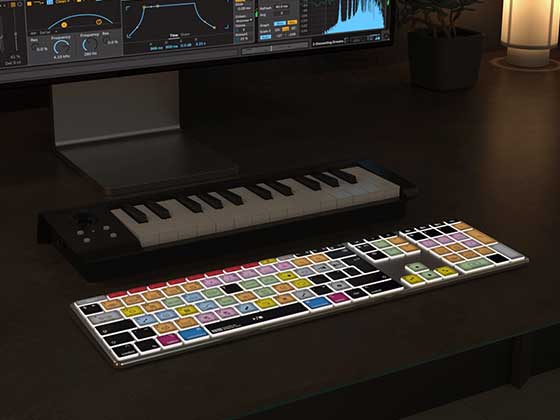
For those looking for a new keyboard, we offer two backlit options: the AB10 Air Wireless Backlit Shortcut Keyboard and the AB10 Core Wired USB-C Backlit Shortcut Keyboard. Both offer illuminated keys to make working in darker recording studios and editing environments easier.
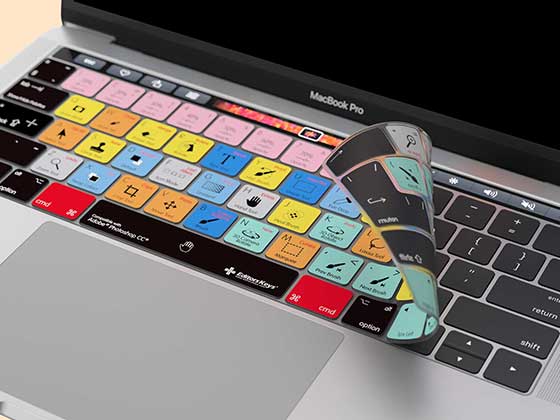
If you'd prefer to keep your existing keyboard, our silicone shortcut covers provide another practical option. They sit directly over compatible keyboards, displaying the relevant software shortcuts while also helping protect against dust, dirt and accidental spills.
Whether you're recording instruments, editing MIDI, arranging tracks or mixing a finished production, having your most frequently used shortcuts clearly displayed can make everyday tasks considerably easier.
Explore the full range of Editors Keys music production keyboards and silicone shortcut covers and find the right setup for your studio.